What after registeration ?
Manish Chaudhary
Nov 22, 2025 4.8 min read
Intro
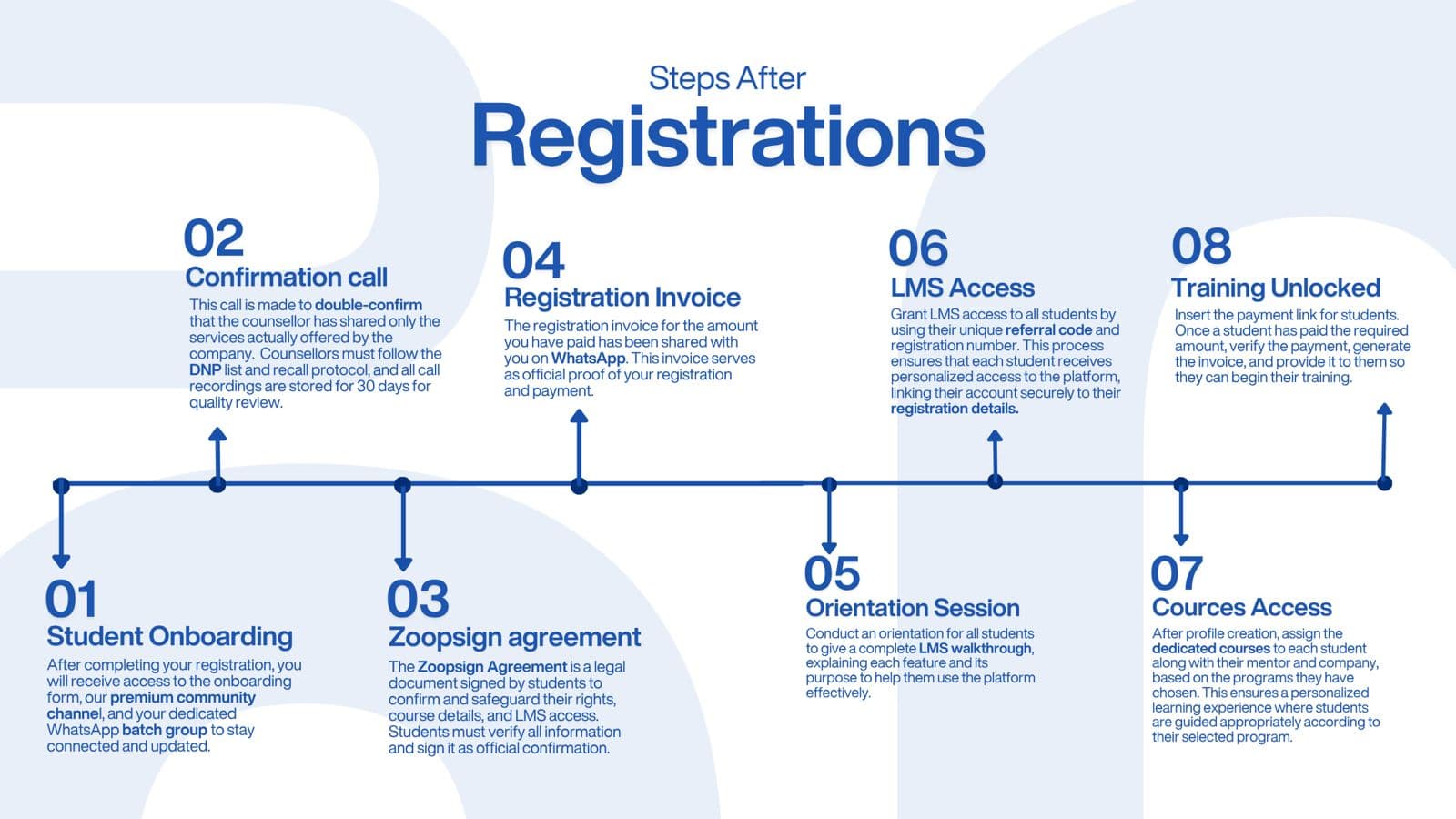
Registering is just the beginning. After you click submit or complete payment, a clear, coordinated process activates to move the learner from “signed up” to “learning.” Below is a friendly, detailed walkthrough of every step that typically follows registration — what it is, why it matters, who does it, and what the learner should expect.
01 Student Onboarding
What it is: Immediately after registration, the learner receives an onboarding package: an onboarding form to complete, links to the community (e.g., premium WhatsApp channel or batch group), and instructions about next steps.
Why it matters: Onboarding collects any missing personal or academic details, introduces the learner to support channels, and sets expectations. It prevents delays later and helps mentors know the learner’s background.
What happens concretely:
- Student receives an email/WhatsApp with an onboarding form and community links.
- They fill in details (contact info, preferred batch/time, basic background).
- They are invited to a batch WhatsApp or community channel to stay updated and receive announcements.
Tips for learners: Fill the onboarding form carefully and join the community group right away — most important announcements and support happen there.
02 Confirmation Call
What it is: A short phone/voice call from a counsellor to confirm the services the student signed up for and ensure there are no misunderstandings.
Why it matters: This call reduces miscommunication, confirms chosen programs, clarifies pricing or add-ons, and verifies that the counsellor shared only accurate information.
What happens concretely:
- Counsellor calls using the contact provided.
- They review program details, schedule, fees, and any special requirements.
- Calls are recorded and stored (for quality/verification) and counsellors follow a DNP (Do Not Promise) and recall protocol as required by the organisation.
Tips for learners: Keep your phone handy after registering and ask any final questions in the call. If you notice any mismatch, bring it up immediately.
03 Zoopsign Agreement (or Enrollment Agreement)
What it is: A formal agreement document (digital signature via Zoopsign or equivalent) that the learner signs to confirm registration, course details, rights, and responsibilities.
Why it matters: This legally protects both parties and locks in the course details, payment terms, refunds, and access rights.
What happens concretely:
- Student receives the agreement link (email/WhatsApp).
- They verify their details and e-sign the document.
- The signed copy is stored as the official record of enrollment.
Tips for learners: Read key clauses (refund policy, course duration, certificate criteria) before signing. Keep a copy for your records.
04 Registration Invoice
What it is: An invoice generated for the paid amount — sent over WhatsApp/email — that acts as official proof of registration and payment.
Why it matters: The invoice is required for company reimbursements, tax records, or internal accounting. It also confirms that finances are settled before granting access.
What happens concretely:
- After payment is verified, the finance/admin team issues an invoice.
- Invoice includes amount, course name, registration number, and contact details.
- It’s shared via WhatsApp or email and stored in admin records.
Tips for learners: Save the invoice and check that your name, course details, and payment amount are correct. Ask for corrections immediately if anything is wrong.
05 Orientation Session
What it is: A scheduled orientation (live session or recorded walkthrough) that introduces learners to the LMS, features, learning path, mentor interactions, and assessment methods.
Why it matters: Orientation reduces confusion, improves platform adoption, and ensures learners know how to use the tools and where to find materials.
What happens concretely:
- Learners are invited to attend a live orientation or provided a recorded walkthrough link.
- Facilitator explains LMS features: dashboard, course modules, assignments, quizzes, tracking progress, and certificate criteria.
- Q&A to resolve initial doubts.
Tips for learners: Attend live if possible — ask questions about deadlines, mentor contact, and where to submit assignments.
06 LMS Access
What it is: Learners receive LMS credentials or are invited using a referral/registration code. Access is personalized and linked to the learner’s registration record.
Why it matters: This step gives learners the actual learning environment: lessons, resources, assignments, and progress tracking.
What happens concretely:
- Admin creates the LMS account or provides a unique referral code and registration number.
- Learner logs in and is linked to their profile, payment status, and course enrollment.
- Permissions are set so only enrolled courses are available.
Tips for learners: Log in immediately, check your profile details, and explore the course structure to plan your study schedule.
07 Courses Access
What it is: After profile creation, the admin or program manager assigns the specific course modules and pairs the learner with a mentor or cohort based on their chosen program.
Why it matters: This ensures each learner gets a curated learning path with appropriate mentors and resources for their selected program.
What happens concretely:
- Courses relevant to the learner’s program appear on their dashboard.
- A mentor or support person is assigned and the learner receives their contact details.
- Any elective or specialization options are confirmed and added.
Tips for learners: Connect with your mentor, ask for a recommended learning plan, and confirm any live session schedules or batch timings.
08 Training Unlocked
What it is: Final verification is completed (payment, agreement, LMS profile), and the learner is granted full access to the training materials, live sessions, recorded lectures, and assignments.
Why it matters: This is the “go” moment: the learner can now start consuming content, completing tasks, and progressing toward certification.
What happens concretely:
- The training modules unlock; live class links are visible; assignment submission portals are active.
- Learner receives instructions for first tasks, orientation tasks, or a week-one checklist.
- Progress trackers and assessment schedules become active.
Tips for learners: Start with the orientation tasks, follow the week-one checklist, and schedule regular study hours. Reach out early to your mentor if anything is unclear.