Where to watch all orientation sessions ?
Manish Chaudhary
Nov 18, 2025 3.3 min read

Where to Watch All Orientation Sessions? – Complete Guide for EduVeda Students
Starting your learning journey at EduVeda Academy becomes easier when students understand the structure, tools, and expectations of the program. This is exactly why Orientation Sessions are conducted for every batch.
To make it simple for learners, EduVeda provides a dedicated portal where students can watch all orientation sessions—Live, Upcoming, and Completed at one place.
👉 Official Orientation Portal:
https://orientation.eduveda.academy/
What is an Orientation Session?
An Orientation Session is the first and most important step after enrolling in a program. It is designed to help students understand:
- The course structure & roadmap
- LMS navigation and how to use student tools
- Study material access
- Assignment & exam procedures
- Skills required to complete the course
- Placement roadmap and support
- Doubt-solving structure and mentor introduction
It ensures that students start their learning journey with clarity, confidence, and a clear direction.
Why Is Orientation Mandatory for All Students?
Orientation is compulsory because it helps students:
- Avoid confusion during the course
- Understand how to use the LMS & Attend live classes
- Know all rules, timelines, and deadlines
- Prepare mentally for the learning journey
- Learn the best way to complete the course successfully
- Save time by knowing everything in advance
Students who attend orientation right from the start perform 2x better in assignments, tests, and attendance.
Where Can You Watch All Orientation Sessions?
EduVeda has created a separate platform where students can access every session in one place:
👉 Visit: https://orientation.eduveda.academy/
This portal contains:
- Live Orientation Sessions
- Upcoming Sessions
- Completed Sessions (Recordings)
- Detailed descriptions of each session
- Instructor details
- Session titles, dates & types

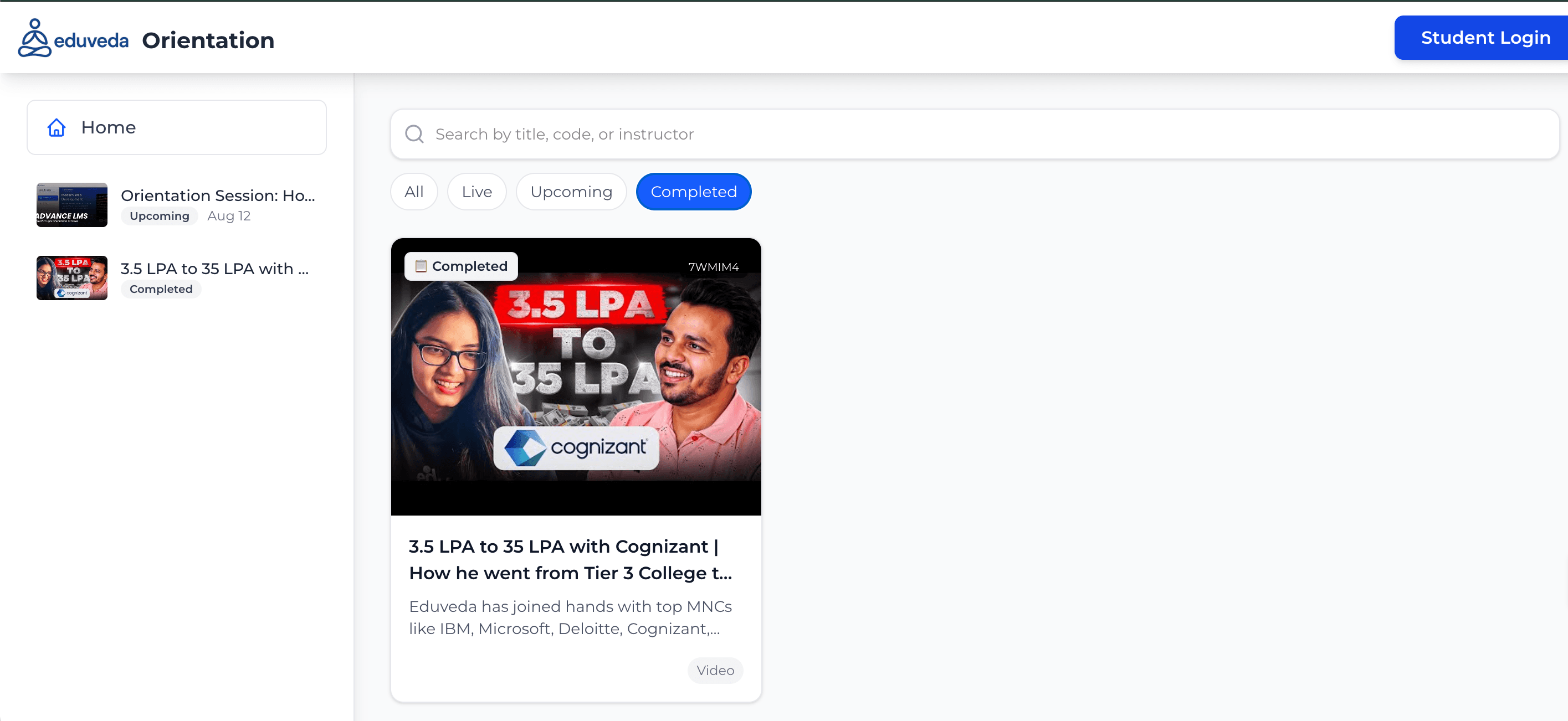
Home Panel (Left Sidebar)
This section displays:
- All available orientation sessions
- Quick access preview thumbnails
- Upcoming & Completed labels
- Session date & status
This sidebar is helpful for students who want to switch sessions quickly.

Search Bar (Top Center)
Students can search orientation sessions by:
- Title
- Course code
- Instructor name
This makes navigation easy when there are multiple batches or sessions.

Session Filters: ALL | LIVE | UPCOMING | COMPLETED
These four filters help students find the exact type of session they need.
ALL Section
Here students can view every orientation session, including:
- Live sessions
- Sessions scheduled soon
- Sessions already completed
This is useful for browsing everything at once.

LIVE Sessions
This tab shows the sessions that are happening right now.
If no session is live at the moment, the page displays:
“No orientations found”
Live sessions automatically appear once the instructor starts the session.

UPCOMING Sessions
This tab shows all the orientation sessions scheduled for future dates.
Students can see:
- Title of the session
- Preview thumbnail
- Date of the session
- Small tag showing “Upcoming”
- Instructor/session code
- Mode (Video / Live)
Example from your screenshot: Orientation Session: How to Navigate the LMS and Learn…
This helps students plan ahead and join sessions on time.

COMPLETED Sessions
This section includes all past sessions.
Students can:
- Watch the recording anytime
- Revisit important points
- Catch up if they missed a session
Example from your screenshot:
“3.5 LPA to 35 LPA with Cognizant | How he went from Tier 3 College to…”
What Students Can Expect Inside Each Session Card
Every session card shows:
- Session Thumbnail
- Status: Live, Upcoming, Completed
- Title of Session
- Short Description
- Session Date
- Session Type (Video / Live)
- Unique session code
This makes orientation sessions easy to understand at a glance.
How to Watch Orientation Sessions? (Step-by-Step)
Step 1: Visit the Orientation Portal
👉 https://orientation.eduveda.academy/
Step 2: Browse through All / Live / Upcoming / Completed
Step 3: Click on the desired session
Step 4: Watch the session (Live or recorded)
Step 5: Replay anytime (Recordings never expire)
What Makes EduVeda Orientation Sessions Special?
✔ Expert-led interactive sessions
✔ Real-time guidance
✔ Covers complete LMS navigation
✔ Helps students avoid confusion
✔ Motivational & career-oriented content
✔ Includes success stories from alumni
✔ Provides clarity about the roadmap
Related insights
More from General assistance
 1 min read
General assistance
How to Sign Your Student Onboarding Agreement via ZoopSign: A Step-by-Step Guide to Review, eSign, and Complete Your Enrollment Process
How to Complete ZoopSign for Eduveda Training & Internship Program What is ZoopSign? ZoopSign is a secure digital signature and document verification platform. Eduveda Traini
Manish Chaudhary
Apr 30, 2026
 1 min read
General assistance
What Is the Eduveda Training and Internship Program? A Complete Guide to Skills, Internships, and Career Growth
Discover the Eduveda Training & Internship Program The Eduveda training and internship program, offered in collaboration with top firms like AWS, provides high-impact, 2-mon
Manish Chaudhary
Apr 30, 2026